Showing posts with label Wonderopolis. Show all posts

Tuesday, September 3, 2013

Inspiring Curiosity with Cloud Shapes

Several weeks ago on Twitter someone posted a TED Talk. This TED Talk was by Gavin Pretor-Pinney: Cloudy with a Chance of Joy. Now why would I blog about that? Watch the TED Talk below and see what comes to your mind!


A couple of things that I really liked was when Gavin was talking about unplugging from everything and just laying back and watching the clouds. He talked about several cloud formations and that got me to thinking about different science standards and how they have to do with cloud shapes. Wouldn't showing this video be a good idea for introducing a unit on clouds? I think so!

The grade levels and the content standards are listed below:

7th Grade: 7.E.1.4 Predict weather conditions and patterns based on information obtained from:
  • Weather data collected from direct observations and measurement (wind speed and direction, air temperature, humidity and air pressure)

  • Weather maps, satellites and radar

  • Cloud shapes and types and associated elevation
5th Grade: 5.E.1 Understand weather patterns and phenomena, making connections to the weather in a particular place and time.
  •  5.E.1.3 Explain how global patterns such as the jet stream and water currents
    influence local weather in measurable terms such as temperature, wind
    direction and speed, and precipitation. 

Another great idea is using Wonderopolis. They have a great wonder of the day #591: What is a Lenticular Cloud?

One idea of how this could be used in the classroom would be as an introduction to your unit. Watch Gavin's TED Talk at the beginning of the unit, then give students an assignment to just look at the clouds they see (maybe over a weekend). They could also take pictures of these clouds to identify later. Another idea is after taking these pictures and identifying the different types of clouds, they could blog about the cloud and maybe mention what type of shape they saw in the clouds.

How will you see joy in the shapes of clouds?


Monday, May 20, 2013

Wonderopolis has a new look!

And new features ...

You can search by Common Core Standards ...

There are even some questions to go along with the text passage ...
 

Wednesday, August 15, 2012

Connecting Birthday and History ...

My birthday is today!
I was looking at Thinkfinity today and noticed the Today in History area ....
I wondered what happened in history on my birthday ... so I clicked on the calendar and went to find out!
That got me thinking about research for students in a class. Each student has a birthday, right? So perhaps for one research project/writing lesson, students would need to research something that happened in history on the day he or she was born. I had grand ideas of using those projects to create a class book or using the multimedia digital projects created to form a classroom gallery. Students could have a choice as to how to share the information collected. Students could investigate the findings of other students ....

So I started playing around with that idea ...
I have a coworker (Marty) who will celebrate his birthday on August 18 ... what happened in history on that day?
I started getting more and more excited about my idea and how rubrics could be formed to assess research and the creation of the projects. I started seeing wonderful creations in my mind. I started thinking of the other dates that are significant in my life that I could look at ...
Another coworker (Dorene) will celebrate her birthday on Sept. 7, so I went looking for the even in history from that day on the Thinkifinity calendar.  I clicked forward to September and found ..... 
the calendar was blank ....
My first thought was ... oh no, another idea down the drain ...  because it won't work
My next thought was ... it may not work exactly the way I had it planned out in my head originally but it still will work in some shape ...
So I started considering alternatives ...  

  • each person could look at events that happened in history on the day he or she was born by looking at it that day  (but what about the kids with Summer birthdays ... my sister's is in July and mine is in August)
  • students could look at the past Wonders of the day on Wonderopolis to find an event to research based on the information that was shared on their birthdays
  • we could look for other resources to use to explore dates in history
That was when I remembered that the Thinkfinity calendar gives you the option to look at days, week, months, and even years. I had seen the ability to see previous ones when looking at the day, week, or month calendars .... so I wondered if I might be able to look at the calendars from previous years ...
So I decided to try!
The good news is that YOU CAN! 
So for my coworker who will celebrate her birthday on Sept. 7, I looked at the calendar from last year to see what event was shared that day!
Yay!
You may have noticed that several of my pictures include a button to click to view more. When you click on that, you are taken to a page describing the event in 2-3 paragraphs. Along with that information, you can also find links to various lessons, activities, and ideas from the Thinkfinity Content Partners that go along with that topic or could be used with that type of information!
The other ideas that I brainstormed above would work too and I predict you can come up with some even better ways to use these dates in history!
I would love to hear some other ideas, so please leave a comment and share them!
Go pick a date and explore ....


Thursday, July 5, 2012

Starting the Day with a Wonder

Let me tell you a little about how I like to find fun things for students to do in class to start the day off right.  I think that the old saying is that Breakfast is the most important meal of the day and that students need it to start the day off in a good way.  Well I think that we also need to start their classroom day off right as well.  Something that feeds their minds when they get to school just as much as breakfast does before school.

About a year and a half ago, give or take a month, I was introduced to Wonderopolis by a co-worker as a site that offered up something different.  What they offered was short video clips that talked about some things that most people just wondered about.  I learned about the site in January of 2011 but the site had been up since October with its first wonder, Why are Flamingo Pink? That launched on Oct 4, 2010.  Wonderopolis is… “a program brought to life by the National Center for Family Literacy, engages and inspires families in the pursuit of education and learning together.” It also a product of Verizon Thinkfinity which… “offer comprehensive teaching and learning resources created by our content partners – the most respected organizations in each academic subject and literacy.”

In January of 2011 I started talking to teachers about how to use Wonderopolis in the classroom and how it could benefit the students as the day begins.  I talked to the teachers and showed them the website and their eyes were wide open by all of the information.  Many times I would show the site to them and they immediately would start talking about how to connect what was on the site with what they were working on in class at the time.  As this was going on I would show them how they could search through all of the Wonders either with a keyword search or through the category options along the left side of the page.  The teachers were amazed at how much information was available to them as they looked at each of the wonders.  There is a description of the wonder, some additional questions, did you know section, some vocabulary words and even some fun project ideas to go along with the wonder of the day.  

I really enjoy the site and will continue to share it with as many teachers as I talk with.  The site offers so many additional resources associated with the wonders that even though they are meant to be short lesson starters, it is more often than not they can be turned into full blown lesson designed in conjunction with the curriculum.  

With all that being said, go to Wonderopolis and see for yourself.  I can be sure that there is something on the site which will add to your daily instruction.  Who knows you may even explore beyond the site to some of the other resources available from Verizon Thinkfinity and extend the learning even further.

Wednesday, February 22, 2012

Are you looking for some Science?

Serving as both the 5th/6th grade Gifted Education teacher and the Grades 3-5 Science Specialist at an elementary school, Jayne Grubbs has a hectic schedule but loves every minute of it! She uses the information and questions from Wonderopolis in some pretty interesting ways. 

In class, Jayne distributes “Curiosity Questions” to her students. Students can earn “bugs” for thinking about and exploring possible answers to those questions … most of which come from Wonderopolis.  The “bugs” students are trying to earn is part of a motivational technique used in her class.

Jayne finds ways to connect what may seem a simple question to a pretty detailed exploration of a science topic. She loves the way she is able to use good nonfiction text from Wonderopolis to integrate reading with science and to even bring in some social studies every once in a while.

Here are a few of the past Wonders she has used to serve as inspiration:

#191 Where do diamonds come from? She used the information about diamonds lead into a discussion of fossils. Students were involved in comparing and contrasting diamonds and fossils. They even had to write diamante poems comparing the two.  I think that was one of her favorite lessons she has done.

She used this one as an introduction to hydroponics and created a very strong science lesson to go along with it. The more recent Wonder #487 Do All Plants Have Roots? would also be a great tie in.

#228 Do Elephants Ever Forget? The exploration of this one prompted the students to explore what makes a person’s memory work and not work. Students were so engaged that one student woke up in the middle of the night afraid of what would happen if he lost his memory and did not remember to breathe.

#422 Is the Sky falling?  This wonder was used to explore meteors and comments in a 3rd grade class to go along with a state objective about how gravity affects things in space. 

#432  Can Woolly Worms Predict the Weather?  This wonder inspired a month long curiosity question and unit about how animals prepare for winter and how can we tell they are preparing for winter.

#355 Do Plants Need Hair Cuts?  To go along with this wonder, her students did an experiment involving placing plant clippings in colored water to enable them to watch how the water moved through the veins in the plant.

Jayne loves how excited the kids are and also mentions that she has so much fun looking at all Wonderopolis has to offer that she could do it all day long! To hear her talk about all the things her students are doing, it is evident how much of an impact these activities are having on both the students and her as the teacher. I really need to get a video the next time we talk.

According to Jayne, she wants students to learn how to ask questions and to think.

Asking questions and exploring topics is what Wonderopolis is all about!!! 

Talk about a great connection!

Monday, February 13, 2012

What is guiding your technology use?

This may or may not come as as surprise to you:

I enjoy sharing the ideas, lessons, and resources I find with others. Recently I have been using twitter to share those things .... a bunch!!

So in my email one day this week, I got a message from a high school teacher with this in the subject: Thanks for your Tweets!

That subject line made me wonder what the message would say:
Thanks for tweeting all of the things you do.  On Friday, you inspired me to go to Wonderopolis and find a good Super Bowl-themed lesson!


That email made me smile and made me want to know more about what from Wonderopolis inspired him and more about the Super Bowl-themed lesson. Since I like to ask questions ... I wrote him back and said I was interested and would like to know more.

Here is his response:
Well, the simple story is:
We had Senior Day on Friday, so I was only going to have 15 students of 26 in my class during 4th period.  There weren't going to be enough students to have a full-blown lecture on content, but we had to so something productive for 90 minutes (and hopefully fun, too).

Enter Wonderopolis.   After your many tweets on Wonderopolis, I finally decided to check it out.  I went to the site and searched for the Super Bowl.  One of the results that came back was a link to Super Bowl history and tickets.  I decided to make the class use the link as a guide to design their own ticket for the Super Bowl.  

Using PowerPoint, my students included the items I required--game logo, date, stadium, seat/row/section and bar code.  The rest of the design was up to them.  My students uploaded their finished assignments to Edmodo to be graded, then walked around the room to see what everyone else came up with.  Back on Edmodo, my students voted on the Super Bowl ticket they liked the best; the winning designer received extra credit on his assignment.

(Wow was all I could say!)

Scott Armstrong teaches Sports and Entertainment Marketing at a North Forsyth High School.  He is letting student instruction guide his technology use rather than the other way around. He figured out what lesson and project he wanted the students to do .... and then decided what technology pieces would work best to accomplish that task (sounds a little like TPACK).

Look at how many ways he was able to use technology with his students .... he used a website as inspiration, a program for students to create/design, and then a contained social media outlet for them to share what they produced.
Scott said that my sharing about Wonderopolis and things I have found there is what encouraged him to even go look at the site.  That made me realize that it was not necessarily something specific that I share but it was just how I keep sharing so I guess I will keep on sharing!

This also helped me to realize how much I need to tell people when something they do (intentional or not) inspires me to do something! It also encourages me to keep sharing the things that I find interesting since I never know what might inspire someone to do something.

Inspiration is all around us and although something may not inspire you, there is no telling how it will inspire someone else ...

In this collage created using Vuvox, you will find the project inspiration, assignment, finished products, and the winning ticket is at the end!

Tuesday, January 3, 2012

I wonder about the beginning ...


When you walk into a technology training session, what do you expect to see?
Do you want to want to see a preview of what the training is about?
Do you want to have something interesting to look at until the training starts?

As someone who leads professional development sessions, I am normally focused on what participants are going to see and hear during the session not before it starts. Recently I have been thinking more about the time between when someone comes to a session and when the training starts.

When I was a classroom teacher, I liked to have a calming atmosphere for students when they entered to class to try to set the stage for learning. There was generally instructions or a journal topic on the board/screen to get students engaged and focused. I liked to get everyone on the same page to prepare for the learning.

I have been in sessions where there is music playing when you come in. I have been in sessions where there are a list of questions or quotes for you to think about, and I have been in sessions where there is nothing to do. I am not thinking about requiring journal writing at the beginning of my training sessions, but I do think it might be a good idea to do or have something at the beginning of a session to get participants focused, thinking, and in the mindset for learning.

I think Wonderopolis does a good job or asking a big picture question accompanied with an image/video to encourage thinking. So I am thinking about creating something using screenshots of some of the Wonders of the Day to run on a continuous loop before certain training sessions start. That would expose participants to questions to promote thinking and possibly even encourage creativity.


I have some favorite Wonders that I might use:
I enjoy looking in the Wonderopolis archives to see what WONDERful Wonders from the Past I can highlight and share. I especially like to look at the Wonder of the Day from one year ago on that particular day.

I challenge you to go look at the Wonderopolis archives (and even at the current ones). Tell me about some of your favorites so I can add them to my collection to show at the beginning of sessions and lessons.


Wednesday, November 30, 2011

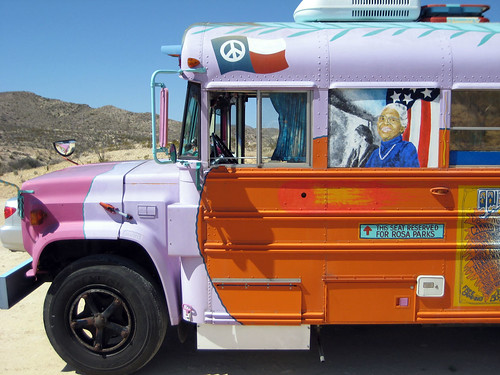
Hop on the Bus with Rosa Parks!

Peace bus in the desert.

Do you know why we celebrate Rosa Parks on December 1? Do your students?

Rosa Parks was not born on December 1, but she did something on December 1 for which she is remembered.

If you need any ideas for things to use in the classroom, check out the available resources from these instructional sites:

Here are some resources I found from searching in Thinkfinity:

Here are some videos from Learn360:
Here are some resources I found from searching in netTrekker:

Tuesday, November 1, 2011

Instructional Resources and Picture Books !!!

What is your favorite type of book?

I am a big fan of picture books for children or all ages (even adults)!

According to the School Library Journal, a group of authors and illustrators have banded together to declare November 2011 as Picture Book Month:

Picture Book Month is an international initiative to encourage and celebrate literacy with picture books, says founder Dianne de Las Casas, an author and storyteller, who along with authors/illustrators Katie Davis, Elizabeth O. Dulemba, Wendy Martin, and author Tara Lazar have joined forces to spread the word that picture books are alive and well, especially in this digital age where an unprecedented amount of picture books have been made into ebooks and are on ereading devices such as the iPad, the Nook, and the Kindle.

I decided to look at a few of my favorite resources (these are all content partners of Thinkfinity)  to see what they have related to picture books:

Wonderopolis
ReadWriteThink (I was surprised how many resources I found for middle and high school)
ArtsEdge
  • Set a Poem to Music:  After exploring a “singable” picture book as a class, each student examines a personally selected poem for rhythm to determine its musical meter. Using previous musical skills, students set the poem to music. As a final reflection, they create a two-page spread of a picture book that contains their “singable” poem.
  • Map it Out:  Explore how illustrations contribute to the telling of a story by creating illustrations to accompany text, and then creating text to accompany illustrations. Students will explore picture books (without words) and discuss the specific elements of the illustrations that "tell" the story. They will learn to "read" illustrations as they look at the ways in which pictures reveal information about the characters, setting, and plot of a story.
  • Animal Habitats: Pre-readers are introduced to animal habitats through story, song, and dramatic play using children’s picture books. Students use chronological ordering and phonics to reinforce beginning literacy skills. Students explore a non-traditional method of book illustration and create their own story page
I was pleasantly delighted with what I was able to find when I went to various instructional resource site and simply searched for "picture books" since there were so many interesting finds! Besides the few sites listed above, here are the search results on Thinkfinity, netTrekker, Shmoop, LEARN NC, and even Learn360!

Let's Celebrate Picture Books this month and all year long!!


*I created the image at the top by copying and pasting a list of picture book title to make a word cloud using Wordle.net (I used a tilde ~ between words to keep the words in the titles together)


Monday, October 17, 2011

"Wonder" What's Happening


A few weeks ago in my blog post on "What I Learned This Week ... " I mentioned a teacher at one of our elementary schools had her students create "Wonder" books and how I introduced her to Wonderopolis. This week as I was talking to teachers in their grade level planning times, I was talking about resources. I was showing some science resources my coworker, Melissa Edwards, had found and one of them was on Wonderopolis (Does Matter Really Matter). 

After I finished the workshop, a teacher came up to me to show me what she was doing. She had materials that were several years old on reading strategies. Within this packet of information, were several pages of "wonders". What this meant was that students "wondered" what would happen next in a story. She was very excited that I shared Wonderopolis with them and how she was going to start using Wonderopolis as part of her reading strategies.

As you can probably tell, Wonderopolis is one of my favorite go-to web resources. I always mention the archived Wonders and the fact that students can comment on the Wonder of the Day and that Wonderopolis always answers back. Be sure to go and check out all the past Wonders as well as the current ones.

Friday, September 30, 2011

What I Learned This Week ...

This was a very interesting week. I was at several different schools meeting with teachers during their grade level planning times. I listened as they talked about what they were going to be studying, and I wrote down notes to myself to find resources to help the teachers. 

One thing that I found very interesting was when all the grade levels were talking about Reading, they all said basically the same thing: students have problems with figuring out the Main Idea and Sequencing in what they are reading. Here is a lesson plan from ReadWriteThink that teachers could use: Reading Information Texts Using the 3-2-1 Strategy. Here is another lesson idea for Main Idea from BrainPop Jr.

4th grade has something new added to Science in their Essential Standards. They are going to be studying Fossils, and they didn't have a lot of resources on Fossils. I was able to find quite a few resources and I added them to the Science tab in the 4th grade LiveBinder. A couple of my favorite fossil web sites were: Dinosaurs For Kids and  How do Dinosaurs Get Their Names. If you are a 4th grade teacher in North Carolina, check these resources out.

In another grade level meeting, a teacher was telling us about her student's "Wonder" books. I asked her if she had heard about Wonderopolis. She said she hadn't. I told her about Wonderopolis and how they have a "Wonder" everyday and all the past "Wonders" are archived for teachers to go and look at. Wonderopolis always starts with several discussion questions. Then they have a "try it out" section. One of my favorite things about Wonderopolis is that there is always vocabulary to go along with the "Wonder of the day".

The elementary team (Dorene Bates, Evan Herreid, Colleen FitzGerald, and Melissa Edwards) talked about what the best way for us all to collect and share resources with all of our schools. We decided on creating a LiveBinder for each grade level. We are all collaborators on these LiveBinder's and all of us can put our resources in one place.  To access these LiveBinder's, go to our DIT wiki page for Elementary Resources. Just click on one of the grade level binders to find resources. Please remember that these binders are not complete, they are a work in progress.

Image: 'Lifelong Learning' http://www.flickr.com/photos/97651299@N00/3679437433

Friday, September 16, 2011

Wonderopolis Categorizes its Wonders


For a number of months I along with some of my colleagues have been talking, tweeting and blogging about the fun and interesting ways educators can use Wonderopolis in their classrooms. Some teachers are using the "Wonders" as their start up activity or as a ticket out the door.
One way I had not thought about using the wonders was to have it tied to the subject material that teachers are delivering in class.

I went back into take a look at some of the past wonders. Which can be done by clicking on the Wonders Tab at the top of the website. I started to make lists of the wonders that could be used in class as part of the curriculum. As I was making the list I had a Duh moment. Over on the right hand side of the Previous Wonders page there is a column labelled as Categories.

This was that light bulb moment because when I started looking through the names I noticed things like Art, Cooking, Environment, History etc., and as soon as I clicked the site provided me with a list of wonders along those categories. With nearly 350 current Wonders on the site and hopefully many more to come these Category listings will eventually grow larger and larger. This will be able to provide educators more choices in delivery of content to students. Plus, who knows, it may motivate a student to take a greater interest in Science, Math, History, English/Language Arts or Weather.

So take a look at Wonderopolis to see what wonders are waiting for you and your students.


Image Provided by: Wonderopolis.org

Friday, July 15, 2011

Spooky Lesson Plans

On Thursday nights this summer, Wonderopolis created Camp What-A-Wonder on Twitter from 8:00 - 9:00 ET (follow #WonderChat). Each week is on a different topic. The first night was about camp memories, the second Thursday about bugs, the third Thursday favorite or worst camp recipes, and last night we talked about spooky stories. Wonderopolis shared a couple of lesson ideas from their partner site Thinkfinity, and that got me to thinking. So, I created a glog on Spooky Stories with links to lesson plans from Wonderopolis, EDSITEment, ReadWriteThink, and ARTSEDGE. All are partners with Thinkfinity. 


These look like very interesting lesson plans to help promote literacy, comprehension, and reading. I don't quite understand it, because spooky was never my favorite genre, but young people love reading scary stories. Why not give these lessons a try?

Tuesday, July 5, 2011

Is a Tall Tale really tall?

Recently a Wonder-of-the-Day from Wonderopolis really got me thinking (but I guess that is what it is supposed to do): Why do they call it a "Tall Tale"?

Focusing on reading genres, like Tall Tales, was something I really enjoyed when I was in the classroom. We would do genre studies where we would explore many examples of a certain genre type and then talk about the similarities and characteristics we found. I also liked to introduce a variety of vocabulary words that could be associated with the genre. Wonderopolis has done a great job of pulling all those thing together! I could have used their help several years ago when I was trying to do all that. :)

I did a search on ReadWriteThink to find resources on Tall Tales:
  • A lesson plan: Thundering Tall Tales: Using Read-Aloud as a Springboard to Writing
  • A tall tales booklist
  • A writing rubric for students to provide evidence that the stories they have written contain elements important in a tall tale
  • A sequencing activity: Did Paul Bunyan gouge out the Grand Canyon before or after he dug the Great Lakes? Students create a life-sized timeline showing the sequence of events in this tall tale.
  • A podcast: Gifts come in all shapes and sizes, and the characters in these four tall tales have plenty of unusual gifts to keep you reading all winter. Listen in to hear about them and to meet Ingrid Law, the author of Savvy and Scumble.
I also searched for Tall Tales resources on ArtsEdge:
*Wonderopolis, ReadWriteThink, and ArtsEdge are all Thinkfinity Content Partners!!

Friday, June 24, 2011

Ever "Wonder" about Digitial Storytelling?

This past week the Department of Instructional Technology provided a series of summer workshops on a variety of great topics ranging from Edmodo to Thinkfinity to digital storytelling. Digital storytelling has always been an area of interest for me so I decided to seek out some resources and ideas on how teachers can use it in their classrooms. Thanks to the great team of people I work with at DIT, I came across Silvia Rosenthal Tolisano's "How to Guide: Digital Storytelling Tools for Educators." Silvia's guide offered many great tools for integrating digital storytelling in the classroom. Silvia's guide provides teachers with step by step instructions and visuals on how to use tools like Audacity, VoiceThread, and many others.

After reading Silvia's guide I was inspired to make a presentation for our summer workshop, "Tell Me a Story." Below is the presentation Melissa and I shared with teachers at our workshop:


As a former classroom teacher, I know sometimes generating a idea, or finding a starting point for a project can be the most difficult part. After last weeks workshop I decided to look for even more ways teachers could use digital stories in the classroom and I came across Wonderopolis. I've heard my colleagues talk about it so I was curious to see if this was something that would go hand in hand with digital storytelling. Needless to say, I was very excited by the possibilities!

Each day Wonderopolis offers a new "Wonder of the Day" by posing different questions about the world around us. In their 60+ list of categories, you can find a Wonder that fits your content area (Social Studies, Math, Language Arts, Technology, Science, etc.) or suits an area of interest. Regardless of what content or grade level you teach, there is a Wonder that would feed a students curiosity and yours! Ever wonder what causes freckles? (I actually had a student ask me this while on a field trip.) Do you know how perennials and annuals are different? What's so special about Broadway? These are all great questions! You can find answers to over 260 questions like these at Wonderopolis on their Wonders page.

What does any of this have to do with digital storytelling? Well...why not have your students illustrate and narrate a story on VoiceThread that explains how a species becomes endangered?
If you are planning a unit on explorers, students could create a timeline (timetoast is a great timeline maker) highlighting what the Lewis and Clark expedition is about. Why not have students create a public service announcement stressing the importance of why we need to wash our hands? As students create their projects, don't forget to remind them to cite their sources. Growing your students creativity and imagination just got easier thanks to Wonderopolis!

Need more information about Wonderopolis? Check out our blog posts!

For more ideas and information on digital storytelling, check out our LiveBinder:

image from http://www.freedigitalphotos.net/images/view_photog.php?photogid=2125

Wednesday, June 22, 2011

Summer Technology Workshops ... A Reflection


This past Friday, June 17 and Monday, June 20, the Instructional Technology Department held a 2 day, 10 hour collection of technology workshops. They were all a big success! I really liked how the workshops built upon each other.

My workshop was about an overview of Thinkfinity. Thinkfinity is a web site that has lesson plans, multimedia, interactives, e-sheets, and professional development webinars. Everything within Thinkfinity and its partner web sites can be accessed from home or school by teachers, students, and parents. All of this is free! I have written several times about Thinkfinity before and it can be found here.

Resources that I used for this workshop can be found on the Thinkfinity Partner Sites on the WSFCS wiki page. You do not have to have access to the wiki in order to view our pages. Some of the resources that I used are pdf's that show how to navigate around the different partner sites within Thinkfinity.

So why do you care about this great web site? Thinkfinity helps to differentiate learning, is aligned with North Carolina Standard Course of Study and National Standards, there are lots of interactives for students, meets standards of the new Teacher Evaluation Tool (McREL), and meets NC Essential Standards for Information and Technology Skills. A couple of the standards that I pulled out of the Teacher Evaluation Tool are: I c - "Teachers lead the teaching profession.Teachers strive to improve the teaching profession. They contribute to the establishment of positive working conditions in their school. They actively participate in and advocate for decision-making structures in education and government that take advantage of the expertise of teachers. Teachers promote professional growth for all educators and collaborate with their colleagues to improve the profession"; and IV e - "Teachers help students develop critical-thinking and problem-solving skills. Teachers encourage students to ask questions, think creatively, develop and test innovative ideas, synthesize knowledge, and draw conclusions. They help students exercise and communicate sound reasoning; understand connections; make complex choices; and frame, analyze, and solve problems."

My absolute favorite partner site from Thinkfinity is Wonderopolis. Wonderopolis has "Wonders of the Day" that can get families to research, share, and discuss together. You see commercials all the time talking about family game night, now they can have family wonder night! A couple of my other favorite sites are National Geographic Education, and ReadWriteThink.

image created in Wordle.net

Thursday, June 9, 2011

The Wonders of Integrating Technology

I have been talking with some teachers over the year about their new ActivClassroom and what they have been doing to integrate the new technology into their instructional day. Most of the responses I have gotten are that the students are interacting with the ActivBoard and the software for their daily lessons and activities designed around the SCOS for NC. They have told me that they are also using the voting devices and ActivSlates with the students.


So.. I have a couple of co-workers in my office that told me about a new website they discovered a few months ago called Wonderopolis that offers, each day, a brand new Wonder of the Day for you to ponder about. I think it is a great site and there are a lot of "Wonders" that I find myself saying, "...wow I really did not know that" or ".. I never even thought about that in that way."


Now in passing I have been mentioning, to those same teachers, about the Wonderopolis site and how great it is. I have talked about how engaging the site could be for students. How, as teachers, they could use the site as a connecting activity for the subjects they are covering in class. Now I am not saying that this could take the place of teachers Essential Questions, but it could be a great morning activity to help the students focus and get ready for the day.


Well today things changed a little bit. I was contacted by one of the teachers whom I have been discussing technology integration throughout the year. She told me that she had been to the Wonderopolis site and really liked it. In the conversation she told me about how she went into the archive to see some of the past Wonders and found a few that she liked. This led to her creating an ActivInspire flipchart around four wonders, which she liked, to share with her students.


When I heard this and saw the flipchart I went to Melissa Edwards, in our office, and let her know about what was going on and to show her flipchart. Well she thought that it was great and wanted to share the information with the people at Wonderopolis. So she, Melissa, contacted Shannon Kohn, the Wonderopolis Community Manager, and gave her the quick story on what was going on. Her response:


"How AWESOME! Thank you so much for sharing this, Melissa! It is so great to see the Wonderopolis connections being made and passed on from educator-to-educator and then educator-to-student!"


The flipchart demos the following Wonders: if you would like to download the flipchart click on this link
How long would it take to travel to Mars? #215
Can you really cook an Egg on the Sidewalk? #243
How does 3D work? #242
Why are School Buses Yellow? #129


All I can say is that I am very happy that our teachers are "Getting It" and "Getting Inspired" to create their own materials that showcase the features of the technology that they have access to in their classrooms. From what the teacher has shared with me, her students really enjoyed the site. Note: in the wonder information there were some words that they were not familiar with that then led to another discussion on vocabulary. This just shows that it only takes something simple to start a great conversation with your students.

Thursday, March 31, 2011

Do You Know Why School Buses Are Yellow?

On my blog, I have a widget from Wonderopolis called Wonder of the Day. On the Wonderopolis homepage, I noticed that there are categories in the sidebar listing everything from Animals to Fairy Tales to History to Nutrition to Seasons to Transportation to Writing (archived Wonders of the Day). I decided to see what was in the Colors category ...

When the Colors category opened up, there is a big picture of a School Bus with the caption: Take a ride with Wonderopolis as we discover how school buses got their signature color.

What a fun topic to learn about! My 4 year old loves to see School Buses. She starts school in August and keeps telling me that she wants to ride a School Bus. We'll see. :)

On this Wonderopolis page, there is a video (Liv's First Day of Kindergarten). There are also some questions to capture the reader's attention:

Have you ever wondered…

  • Why are school buses yellow?
  • Is “school bus yellow” a real color?
  • What is the most attention-grabbing color?
Following those questions is a Did You Know? section with lots of fun facts about the color "school bus yellow" and how it captures attention. I learned the "school bus yellow" is not a pure yellow or a pure orange but a mix of the two. I learned something today!

There is a Try it Out! section as well as Wonder words to know and use on the page. There are so many ways parents and teachers can use the wealth of ideas here to have a discussion or even just to spark an interest. There is even a link to the Smithsonian National Museum of American History's interactive.

At the end of this Wonder, there is a clue about the Wonder of the Day for the next day ...

So much great stuff!

I shared the Wonderopolis site as an example of one thing a teacher could do to use some online tools and sites to help Build Literacy in the Classroom. Think of all the reading and writing that simple ideas can serve as starters for ....

Friday, March 18, 2011

Have You Ever Wondered ...?

I have been invited to attend the 20th Annual National Conference on Family Literacy. I am very excited about attending this conference. One of the things they have asked me to do was to send digital images of blogs, wikis, etc. to share at the panel presentation I will be a part of. This reminded me that I hadn't written a blog post about Wonderopolis™. I wrote a blog post about Thinkfinity resources for Black History Month, one for Smithsonian's History Explorer, and Thinkfinity from Verizon.

Wonderopolis™ is a brought to us from the National Center for Family Literacy. According to their website; "Wonderopolis™ engages and inspires families in the pursuit of education and learning together." I really love the use of engages and inspires families. As I go through the daily Wonders, I see lots of things that I have wondered about. Some of my favorites have been #20 What Makes Popcorn Pop; #21 What Fairy Tale Ending Would You Change; and #149 How Many Peanuts are in a Jar of Peanut Butter. I like #20 and #149 because I like eating popcorn and peanut butter and jelly sandwiches (separately, not at the same time). #21 I like because I have shared with teachers the ReadWriteThink lesson plan resources on Fractured Fairy Tales and this fits right into those resources. 

Some other things that I like about the wonders of the day:

There is always an introductory video. This is always a good lead into a lesson or activity.
Questions are listed of what people have wondered about. These would be good "Essential Questions" to start out with.

The "Did You Know" section and "Try it Out" section gives you an explanation of the wonder and some extension activities to try.
The two that I like the best are: vocabulary words and lesson plans attached to the wonder. These are huge! We are always trying to get our students and children to build their vocabulary. If a teacher has an interactive white board, they could take these vocabulary words and make activities for students. Then, they could create extension activities using the lesson plan attached.

One of the past wonders (on dictionary's I think) had a great idea for vocabulary. It said to go to a daily word website, write the word down on an index card, write the definition, draw a picture to illustrate the word, and then share it with someone. Instead of writing the word down on paper, another idea would be to create a Glog (using EDU Glogster). The students could do the same thing on a Glog as on an index card, but it would be digital and could be shared with other classes.

Why don't you go and check out Wonderopolis™ and view the wonders of this website.